Wednesday, 20 February 2013

IOS 6 DOWNLOAD LINK
iPad 4 (wifi iPad3,4): 6.1.2, 6.1, 6.0.1
iPad 4 (GSM iPad3,5): 6.1.2, 6.1, 6.0.1
iPad 4 (CDMA iPad3,6): 6.1.2, 6.1, 6.0.1
iPad mini (wifi iPad2,5): 6.1.2, 6.1, 6.0.2, 6.0.1
iPad mini (GSM iPad2,6): 6.1.2, 6.1, 6.0.2
iPad mini (CDMA iPad2,7): 6.1.2, 6.1, 6.0.2
iPad 3 (wifi iPad3,1): 6.1.2, 6.1, 6.0.1, 6.0
iPad 3 (GSM iPad3,3): 6.1.2, 6.1, 6.0.1, 6.0
iPad 3 (CDMA iPad3,2): 6.1.2, 6.1, 6.0.1, 6.0
iPad 2 (new gen iPad2,4): 6.1.2, 6.1, 6.0.1
iPad 2 (iPad2,1): 6.1.2, 6.1, 6.0.1, 6.0
iPad 2 (GSM iPad2,2): 6.1.2, 6.1, 6.0.1, 6.0
iPad 2 (CDMA iPad2,3): 6.1.2, 6.1, 6.0.1, 6.0
iPhone
iPhone 5 (GSM iPhone5,1): 6.1.2, 6.1, 6.0.2, 6.0.1, 6.0
iPhone 5 (Global iPhone5,2): 6.1.2, 6.1, 6.0.2, 6.0.1, 6.0
iPhone 4S: 6.1.2, 6.1.1, 6.1, 6.0.1, 6.0
iPhone 4 (GSM iPhone3,1): 6.1.2, 6.1, 6.0.1, 6.0
iPhone 4 (GSM iPhone3,2): 6.1.2, 6.1, 6.0.1, 6.0
iPhone 4 (CDMA iPhone3,3): 6.1.2, 6.1, 6.0.1, 6.0
iPhone 3GS: 6.1.2, 6.1, 6.0.1, 6.0
iPod touch
iPod touch 5G (iPod5,1): 6.1.2, 6.1, 6.0.1, 6.0
iPod touch 4G (iPod4,1): 6.1.2, 6.1, 6.0.1, 6.0
iPad 4 (GSM iPad3,5): 6.1.2, 6.1, 6.0.1
iPad 4 (CDMA iPad3,6): 6.1.2, 6.1, 6.0.1
iPad mini (wifi iPad2,5): 6.1.2, 6.1, 6.0.2, 6.0.1
iPad mini (GSM iPad2,6): 6.1.2, 6.1, 6.0.2
iPad mini (CDMA iPad2,7): 6.1.2, 6.1, 6.0.2
iPad 3 (wifi iPad3,1): 6.1.2, 6.1, 6.0.1, 6.0
iPad 3 (GSM iPad3,3): 6.1.2, 6.1, 6.0.1, 6.0
iPad 3 (CDMA iPad3,2): 6.1.2, 6.1, 6.0.1, 6.0
iPad 2 (new gen iPad2,4): 6.1.2, 6.1, 6.0.1
iPad 2 (iPad2,1): 6.1.2, 6.1, 6.0.1, 6.0
iPad 2 (GSM iPad2,2): 6.1.2, 6.1, 6.0.1, 6.0
iPad 2 (CDMA iPad2,3): 6.1.2, 6.1, 6.0.1, 6.0
iPhone
iPhone 5 (GSM iPhone5,1): 6.1.2, 6.1, 6.0.2, 6.0.1, 6.0
iPhone 5 (Global iPhone5,2): 6.1.2, 6.1, 6.0.2, 6.0.1, 6.0
iPhone 4S: 6.1.2, 6.1.1, 6.1, 6.0.1, 6.0
iPhone 4 (GSM iPhone3,1): 6.1.2, 6.1, 6.0.1, 6.0
iPhone 4 (GSM iPhone3,2): 6.1.2, 6.1, 6.0.1, 6.0
iPhone 4 (CDMA iPhone3,3): 6.1.2, 6.1, 6.0.1, 6.0
iPhone 3GS: 6.1.2, 6.1, 6.0.1, 6.0
iPod touch
iPod touch 5G (iPod5,1): 6.1.2, 6.1, 6.0.1, 6.0
iPod touch 4G (iPod4,1): 6.1.2, 6.1, 6.0.1, 6.0
Wednesday, 13 February 2013


Thursday, 31 January 2013
Snapea android mannager
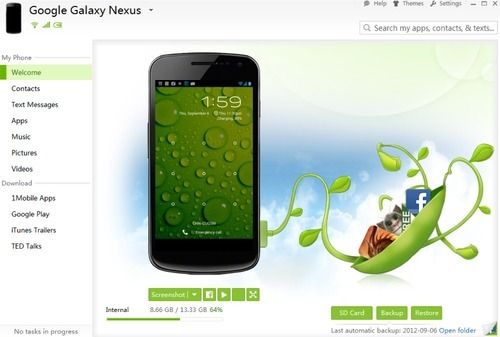
For the typical Android user, content is scattered across a
bunch of different places. Google Play for your apps; iTunes for your
music; maybe DropBox or Google+ for your photos; and text messages are
stuck on your phone.
- SnapPea is the solution for users who want all of their stuff in one place. It gives you instant access to your apps, music, pics, and texts from your Windows desktop. Transfer files, share pics, or text message from the comfort of your computer.
- SnapPea also sideloads free apps to your Android with just one click. It’s a lifesaver for users with a slow or expensive mobile data plan. Downloads come from 1Mobile, Google Play, iTunes Trailers, and TED Talks, with more on the way.
- SnapPea for Windows is a free download at www.snappea.com It supports instant WiFi or USB connection to over 1000 different Android phones and tablets. And SnapPea remembers your device, so you can connect over WiFi anytime without re-entering a passcode.
SnapPea is now in public beta for Android users worldwide.
- Intro video: www.youtube.com/watch?v=ja89AwYlmgk&feature=plcp
- Screenshots and more: http://snappeablog.tumblr.com/
ITOOLS 2012
iTools 2012 Beta 1107
English
iTools 2012 Build 1107
- Support for iPad Mini, iPad4
- Add the guidance of old program cleaning
- Optimize the batch operation experience
- Improve import photos experience
- Improve the program stability and repair some known problems
Download


Subscribe to:
Posts (Atom)